
What if sharing your wedding photographs felt as considered as the day itself? Knowing how to share wedding photos with family means more than sending a link. Relatives use different devices, large galleries can feel daunting, and a cherished image may lose quality or reach a wider audience than you intended.
You want everyone to enjoy the memories, from relatives who are comfortable browsing online to those who would rather hold a photograph in their hands. A thoughtful approach makes access simple without treating privacy or image quality as afterthoughts.
This guide walks you through choosing a practical sharing method, organizing photographs so family can find their favorites, and setting clear expectations about downloading or posting images. You’ll also learn how to keep a high-resolution copy and offer options for relatives who prefer prints. The goal is a shared wedding story that feels welcoming, beautifully presented, and still yours to protect.
Key Takeaways
- Learn how to share wedding photos with family through a simple sequence that makes a large collection easier to enjoy.
- Compare private galleries, shared cloud albums, and printed keepsakes to find an approach that suits your relatives and desired level of control.
- Keep images ready for printing by sharing high-quality files rather than relying on screenshots or compressed messages.
- Make access more welcoming with a brief personal note and a format relatives can use on their preferred device.
- Preserve the memories beyond the initial share with a clearly labeled master archive and a separate backup.
How to Share Wedding Photos with Family Without Overwhelming Them
Sharing wedding photographs brings the celebration back into the room. A parent can linger over a portrait, a cousin can find the moment everyone laughed, and relatives who couldn’t attend can feel closer to the day. But opening a collection of hundreds of meaningful images can feel like another task to manage. A little curation makes the experience feel generous, not overwhelming.
A family-ready wedding photo share is a thoughtfully selected, clearly organized collection that relatives can browse with ease and access according to the couple’s wishes.
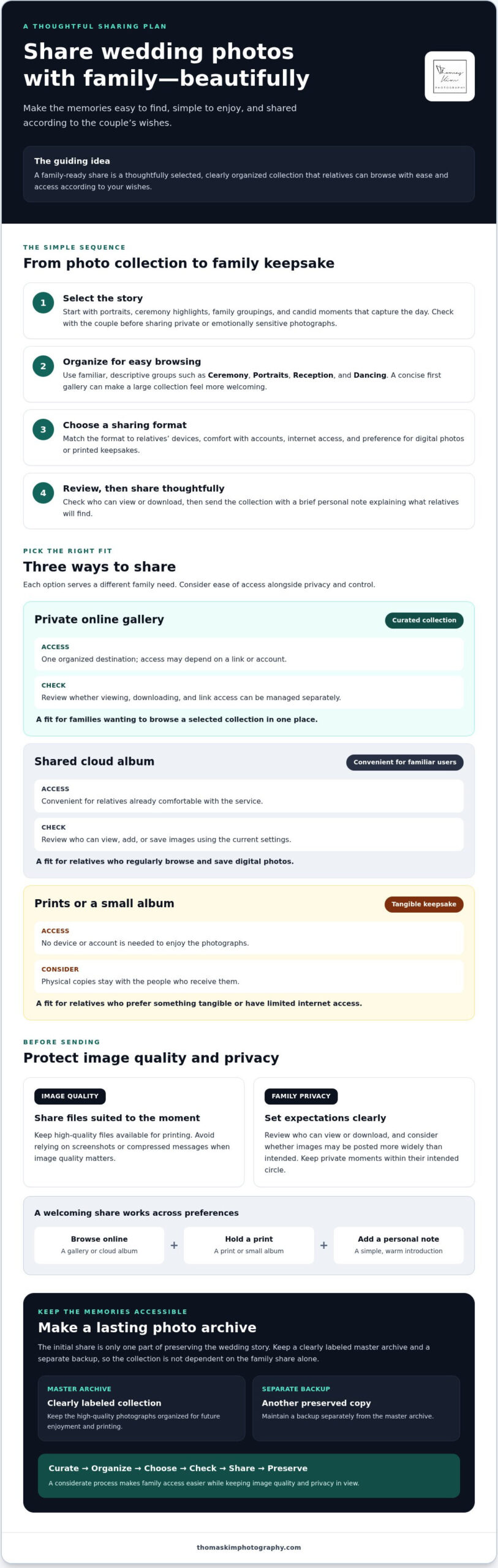
For a simple answer to how to share wedding photos with family, follow a deliberate sequence: select the photographs, organize them into themes, choose a sharing method, review access and permission settings, then send the link or copies with a brief personal note. This turns photo sharing into a considered part of preserving the wedding story, rather than an unfiltered image dump.
Choose the wedding photos your family will want to revisit
Begin with images that help relatives relive the day: portraits, ceremony highlights, family groupings, and candid moments that capture its atmosphere. Together, these photographs create a coherent visual story. Sending every frame at once can make meaningful images harder to find, while a considered first selection gives family a welcoming place to begin.
Before sharing, check with the couple about private or emotionally sensitive photographs that should remain restricted. A moment may mean a great deal to the people in it without being right for a wider audience. A quick conversation can prevent an intimate image from reaching people outside its intended circle.
Organize wedding photos so relatives can browse with ease
Make the collection intuitive at a glance. Group photographs under clear themes such as Ceremony, Portraits, Reception, and Dancing. Use descriptive folder names instead of camera filenames or unexplained numbers, so relatives can find a particular moment without opening every file.
Keep the initial selection manageable. You might share a concise first gallery that follows the day’s natural rhythm, then send additional photographs later. This gives relatives an easy first visit and leaves room for the story to unfold over time.
- Select: Choose defining portraits, family moments, and highlights.
- Organize: Group images with familiar, descriptive labels.
- Choose and check: Pick a sharing method, then review who can view or download.
- Send: Include a warm note explaining what the collection contains.
Choose a Wedding Photo Sharing Method That Fits Your Family
The best way to share wedding photographs depends on the people receiving them. A private online gallery can keep a large collection together, a cloud album may suit relatives who already use online storage, and prints offer a welcome alternative for family members who prefer something tangible. Choose based on your relatives’ devices, comfort with accounts, and preferred way to view photographs, not simply on the number of features a platform advertises.
When a private online gallery makes sharing simpler
A private gallery can gather selected images in one place, reducing scattered attachments and repeated messages. Before choosing one, confirm how its current settings work: Can relatives view without downloading? Are downloads available when wanted? Can link access be limited? Features and instructions vary by service. Don’t assume a photographer uses a particular gallery platform. Ask what delivery and sharing options are available.
When cloud albums, messaging, or prints are more practical
Cloud albums can work well for relatives who already know how to browse and save images there. Messaging is better for a small selection of highlights, since a long stream of files can be difficult to revisit and some apps may alter image quality. For lasting physical enjoyment, choose a few meaningful prints or a small album. The Library of Congress also offers guidance on the long-term preservation of digital photos, a useful complement to deciding how family will view them today.
For couples considering how to share wedding photos with family, match the method to the people who will use it, then test access before sending. Thomas Kim Photography’s wedding photography information can help you consider how the images become part of your family’s lasting story.
Protect Wedding Photo Quality and Family Privacy When Sharing
Image quality and privacy are part of sharing wedding photos with family thoughtfully. A convenient copy for viewing on a phone isn’t always the best file for printing or long-term storage. Preserve the highest-resolution files included in the photographer’s delivery, and share smaller viewing copies only when they’re more practical. Camera original files aren’t necessarily part of a photographer’s delivery, so confirm which files you’ve received before making plans to print or archive them.
Use the gallery’s download option rather than saving screenshots. Screenshots capture what’s displayed on a screen, not the full image file. Screenshots and messaging-app compression can reduce detail, which may be subtle on a phone but more noticeable in a print. For general advice on keeping your digital photos safe, review practical guidance on managing and protecting digital images.
Set considerate boundaries before sending the wedding gallery
Before sharing, ask the couple who should have access and whether recipients may forward the link. A private link or password may help limit access if the chosen platform supports those controls, but settings differ. Check the current instructions rather than assuming a feature is available. Make the couple’s preferences easy to understand. For intimate portraits or family-sensitive moments, invite relatives to ask before posting publicly.
A warm, direct note is often enough: “We’re delighted to share these memories with you. Please check with us before posting photographs publicly, and don’t forward the gallery link.” This sets a clear boundary without diminishing the joy of sharing.
Help family members download and preserve photographs
Keep download instructions simple. If the platform allows it, explain how to select an individual image or download a folder. If the steps look different on a relative’s device, direct them to the service’s current help guidance. Don’t promise that every gallery offers the same controls. A brief test download can help you confirm that your instructions make sense before sending them to the whole family.
Encourage relatives to save downloaded images in a clearly named folder, such as “Maya and Daniel Wedding Photos,” instead of leaving them buried among general downloads. The couple should also retain a separate, secure backup of the delivered photographs, independent of the shared gallery. That way, family can enjoy the collection while the couple keeps a reliable copy if a link expires, settings change, or a device is lost.
Make Wedding Photos Easy to Enjoy for Relatives of Every Generation
A beautiful gallery is only useful if each relative can comfortably open and enjoy it. Some family members will browse on a phone, others may prefer a tablet or computer, and relatives with limited internet access may find a large collection slow to load. When deciding how to share wedding photos with family, consider the people receiving them as carefully as the platform itself.
Make the first step clear. Send one link, explain what it contains, and tell relatives how to view or download photographs if those options are available. Don’t assume that age determines someone’s comfort with technology. Asking about preferences is more thoughtful than deciding for them.
Write a family-friendly message to accompany the gallery
A personal note makes a link feel like an invitation, not a technical instruction. Include a warm greeting, a short description of the photographs, and simple directions. Mention any sharing preferences graciously, and tell relatives whom to contact if they have trouble opening the collection.
Keep the instructions concise and adapt them to the actual platform. If access is limited to invited relatives, say so plainly without making the message feel formal or forbidding.
Choose a sharing approach for older relatives or less-connected family
Ask each relative whether they’d prefer a digital gallery, printed photographs, or both. Someone using a phone with a small screen may appreciate viewing the gallery on a larger device. Someone with a slow connection may prefer a few selected images rather than a full collection. Offer one-to-one help without making anyone feel rushed.
For relatives who would rather not browse online, a small set of prints can bring the photographs into everyday life. You might also arrange a visit to look through the pictures together, turning the practical task of opening a gallery into a moment of conversation and reminiscence. The goal isn’t to make everyone use the same method. It’s to make the memories accessible in a way that feels natural to each person.
If you’re planning your own celebration, explore wedding photography as part of how you’ll preserve and share its story with the people you love.
Create a Lasting Wedding Photo Archive and Share It Thoughtfully
A family gallery is made for sharing; a master archive is made to last. Keep one clearly labeled collection of the delivered wedding photographs separate from the copies or selections shared with relatives. This makes it easier to preserve the complete story while updating what family can access without disturbing your own record.
Keep a dependable copy of the wedding photographs
Choose a secure primary storage location for the master archive and, where practical, keep a second backup separately. Check periodically that the files still open and the backup is intact. Use folder names that will make sense years from now, such as “Wedding,” “Ceremony,” and “Family Portraits,” rather than dates or abbreviations only the couple understands. Descriptive filenames can also help future family members recognize important moments.
Close the loop with a repeatable routine:
- Check access: Confirm the family share still opens as intended and reflects the couple’s preferences.
- Save the collection: Keep the delivered photographs together in a clearly named master archive.
- Back it up: Maintain a separate additional copy, then periodically confirm it remains accessible.
- Share selectively: Add newly chosen portraits or printed keepsakes in a later family update.
A later note can give the collection a second life. Share a newly selected family portrait, a favorite reception moment, or a few prints chosen especially for relatives. Thoughtful updates keep loved ones connected without asking them to revisit a large gallery each time.
Let intentional photography support the family story
Clearly composed family portraits can be especially meaningful in a shared collection because relatives can quickly find the people and groupings they want to revisit. A considered approach to wedding photography also helps preserve formal portraits and the unscripted moments around them. Explore Thomas Kim Photography’s wedding party and family portraits for examples of how these images can contribute to a lasting record of the celebration.
Learning how to share wedding photos with family is ultimately part of caring for the photographs after the celebration: curate with intention, make access clear, and preserve a dependable master copy. Professional wedding photography can give that family archive an artful visual foundation, holding the people, relationships, and fleeting moments of the day in a form loved ones can return to over time.
Let Your Wedding Story Live On
The best way to share wedding photos with family is to make the collection welcoming to browse, respectful of the couple’s privacy, and carefully preserved for the years ahead. A thoughtful selection gives relatives an inviting first look, while an accessible format and clear expectations help everyone enjoy the images with confidence.
Keep a dependable master archive apart from shared copies, and consider how professional photographs can bring the people and emotion of the day into lasting focus. Thomas Kim Photography provides wedding photography and videography with an emphasis on artistic quality and premium production standards, creating a considered visual record of meaningful celebrations.
Explore Thomas Kim Photography’s wedding photography and imagine the story your family will return to long after the celebration. With care in how you capture, share, and preserve each moment, those memories can remain close for years to come.
Frequently Asked Questions
What is the easiest way to share wedding photos with family?
A single, organized online gallery is often the easiest starting point if your relatives can open it on their devices. Select meaningful photographs, arrange them in clear sections, then send one link with a short explanation. Before sharing, test the link and check the access settings. For Los Angeles families spread across different neighborhoods or living farther away, one shared destination can make viewing simpler than sending many separate attachments.
Can I share wedding photos without letting everyone download them?
Possibly, depending on the gallery or album service. Some platforms may allow viewing and downloading to be managed separately, while others may not offer that distinction. Check the service’s current settings and instructions before inviting family. Keep in mind that no viewing setting can prevent someone from taking a screenshot or photographing a screen, so share only images the couple is comfortable showing to the intended audience.
How do I share wedding photos with relatives who are not comfortable with technology?
Offer a simple choice: a digital link, a few printed photographs, or both. If a relative wants to view the gallery but needs help, arrange a phone call or sit together and open it on a familiar device. A brief message with clear instructions can help, too. Don’t assume someone’s comfort based on age; ask what would make enjoying the photographs easiest for them.
What is the best way to send wedding photos without losing quality?
Use the platform’s download option to save image files, especially if relatives may want to print them. Messaging apps can compress photographs, and screenshots don’t preserve the full image file. Check whether the gallery offers high-resolution downloads, since features vary by service. Keep a separate copy of the delivered photographs in the couple’s archive, and use smaller viewing files only when convenience matters more than print quality.
Should I share all my wedding photos with family?
No. Start with a thoughtful selection of portraits, ceremony highlights, family groupings, and candid moments rather than sharing every photograph at once. A curated collection is easier to browse and gives relatives a clear story of the day. Check with the couple before including intimate or sensitive images, then share additional selections later if they wish. The complete archive can remain separate from the family collection.
Can family members post our wedding photos on social media?
That’s a choice for the couple to make, so communicate preferences before sending the gallery. You might welcome public posts of selected portraits while asking relatives to keep intimate moments within the family. A friendly note can explain what may be shared and ask guests to check before posting images featuring other people. If privacy matters, remember that a private link doesn’t control what recipients do with photographs they can view.
How should I organize wedding photos before sharing them?
Group photographs in a way relatives can understand at a glance, such as Ceremony, Family Portraits, Reception, and Dancing. Choose descriptive folder names instead of camera numbers or unexplained filenames. Keep the shared selection distinct from the master archive, and label that archive clearly so it remains understandable over time. If you’re sharing with relatives around Los Angeles and beyond, a consistent structure makes the collection easier to browse wherever they open it.